
Goals tracking
A goal defines a conversion that Testa measures for an experiment. When a visitor completes a goal, Testa records it against the variation that visitor was assigned to, so you can compare how each variation performs.
An experiment can have more than one goal, and a goal does not have to be the final conversion. Any step worth measuring can be a goal. Each goal counts once per visitor, so goal numbers describe how many visitors converted, not how many events occurred.
Page-view goal
A page-view goal is completed when a visitor loads a page whose URL matches the value you configure. Use it for conversions that correspond to reaching a specific page, such as a thank-you or order-confirmation page.
Match types
| Match type | The goal is counted when |
|---|---|
| Exact | The origin and path of the URL match the configured value. Extra query parameters on the visitor's URL are ignored. If the configured value includes parameters, they must be present with the same values. |
| Contains | The URL contains the configured value anywhere. |
| Regex | The URL matches the regular expression. |
With a goal value of https://example.com/success:
| Match type | Visitor URL | Counted |
|---|---|---|
| Exact | https://example.com/success | Yes |
| Exact | https://example.com/success?utm_source=ads | Yes, extra parameters are ignored |
| Exact | https://example.com/success/ | No, the trailing slash changes the path |
| Exact | https://example.com/order/success | No |
| Contains | https://example.com/order/success | Yes |
| Contains | https://example.com/success?id=123 | Yes |
A goal counts once per visitor
If a visitor reaches /success and reloads the page four times, the goal is
recorded once. Testa stores a single completion per visitor per goal, so reloads,
back-navigation, and repeat visits do not inflate the result.
Dynamic URLs
Confirmation and account pages often contain an identifier, for example
https://example.com/order/8f14e45f/success. An exact match will never match
these, because the identifier is different for every visitor. Match the stable part
of the path instead:
- Contains
/success - Regex
^https://example\.com/order/[^/]+/success$when the match needs to be stricter
Measuring steps in a journey
To see where visitors drop out, create one page-view goal per step rather than a single goal on the final page. For a journey of homepage → product → cart → checkout:
| Goal | Match type | Value |
|---|---|---|
| Homepage | Exact | https://example.com/ |
| Product | Contains | /product |
| Cart | Contains | /cart |
| Checkout | Contains | /checkout |
The homepage uses Exact because a Contains value of / would match every page. Each
goal reports the share of visitors in each variation that reached that step, so the
experiment shows progression through the journey instead of a single outcome.
Tracking one step in a single journey
When the same step exists in more than one journey, matching on the step alone counts all of them. Include the part of the URL that identifies the journey.
If the email step is https://example.com/flow-1/email in one journey and
https://example.com/flow-2/email in another, use Contains /flow-1/email.
If the journey is identified by a query parameter instead, for example
https://example.com/email?flow=1, use Regex /email\?.*flow=1.
Click goal
A click goal is completed when a visitor clicks an element you select with a CSS selector. Use it for interactions that do not change the page, such as adding an item to a basket.
A selector of #add-to-cart targets this element:
<button id="add-to-cart" class="btn btn-primary">Add to cart</button>Targeting one element or many
A click goal binds to the first element that matches the selector. Make the
selector specific enough to identify that one element, ideally with an id or a
data attribute:
<button id="checkout-cta">Checkout</button>If the same action appears many times on a page, such as an "Add to cart" button on every product card, a click goal records clicks on the first button only. To count all of them, send a custom event from your own click handler and use a custom event goal:
document.addEventListener('click', function (event) {
  if (event.target.closest('.add-to-cart')) {
    window.Analytica.pushEvent('add_to_cart');
  }
});
Timing
Click goals are bound shortly after the page loads. If the element is not present yet, Testa retries for roughly a third of a second and then stops. Elements that appear later, such as content inside a modal the visitor opens, are not bound. Use a custom event for those.
Custom event goal
A custom event goal is completed when your own code sends a named event to Testa. Use it for conversions that are not a page view or a click, and for anything where your code needs to decide that the conversion happened.
Setup has two halves, and the name must be identical in both.
1. Create the goal in the dashboard. Set the goal type to Custom Event and enter the event name.
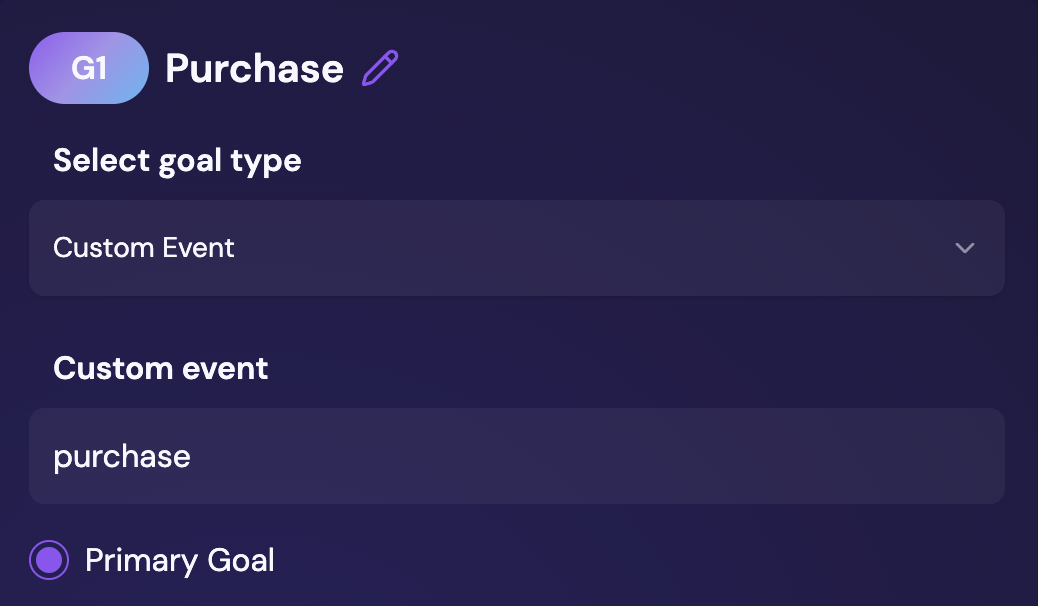
2. Send the event from your site. Call pushEvent with the same name and an
optional object of properties:
window.Analytica.pushEvent('purchase', {
  order_id: 'ORDER-123',
  total: 99.99,
  currency: 'USD'
});
Because the event name matches the goal, Testa records the conversion against the
variation the visitor was assigned to. The event is only recorded for visitors who
are in an experiment, so calling pushEvent for every visitor is safe.
Measuring several steps
Custom events work as journey steps in the same way as page-view goals. Send a distinct event per step and create one goal per event:
window.Analytica.pushEvent('initiate_checkout');

// later, once payment is confirmed
window.Analytica.pushEvent('purchase', { total: 99.99 });
Create one Custom Event goal with the event name initiate_checkout and another
with purchase. Each counts once per visitor, so together they show how many
visitors started checkout and how many completed it.
Why the same conversion can be tracked two ways
A purchase can be defined as a page-view goal matching /success, or as a
purchase custom event. Both are valid, and the difference is how much control you
have over when the conversion is recorded.
A page-view goal requires no code. It infers the conversion from the visitor reaching a page, which is enough whenever landing on that page reliably means the conversion happened.
A custom event goal gives you more control. Your code decides exactly when the event fires, so you can record the conversion at the moment payment is confirmed rather than when a page loads, attach properties such as the order value, and track conversions that have no page of their own. A page view is inferred rather than stated, so a visitor can complete a purchase without the goal being recorded, for example if the redirect to the confirmation page never happens.